Channels Name
Before diving into the configuration, it's important to understand why assigning a name to each channel matters.
Giving each channel a meaningful name is essential for better identification of the signal you're visualizing. Instead of remembering that CH-1 is connected to the crankshaft sensor and CH-2 to the injector, you'll see it directly on screen. This becomes even more valuable later, when you save waveforms or share them with other users — a properly named channel makes your captures self-explanatory and much easier to interpret for anyone reviewing them.
How to Assign a Channel Name
Assigning a name is quick and simple:
- Click on the channel name (for example, CH-1) in the channel bar.
- A dialog appears listing all the available names.
- Select the proper name for that channel from the list.
That's it — the channel is now labeled with the name you chose.
Names with Special Features
In the selection dialog, you'll notice that some names are displayed in different colors rather than black. These colored names are not just cosmetic: they indicate that a special function is associated with that channel name. In other words, when a name has a color, selecting it also enables the corresponding feature linked to that name. Black names are plain labels with no associated function.
Managing the Names List
In Settings → Channels you can see all the available names that can be assigned to the oscilloscope channels. From this screen you can also:
- Hide unused names by clicking the eye icon next to them.
- Add or remove custom names with the + and − buttons. Note that you can only remove custom names you created yourself.
- Import a custom names list from a file by clicking the document icon with the + (for example, a configuration saved on another phone).
When you modify this list, HScope saves the current configuration in a file called Channel_Names.cfg under your HScope document folder.
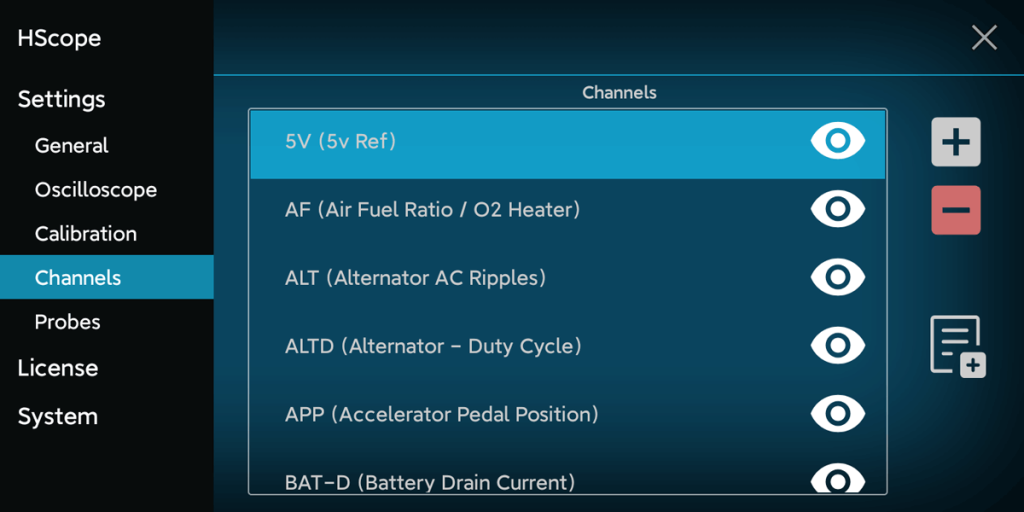
Current list of standard channel names:
| Name | Description |
|---|---|
| 5V | 5V Ref |
| AF | Air Fuel Ratio / O2 Heater |
| ALT | Alternator AC Ripples |
| ALTD | Alternator - Duty Cycle |
| APP | Accelerator Pedal Position |
| BAT-C | Battery Current |
| BAT-V | Battery Voltage |
| BOOST | Boost Pressure |
| CAN-H | Controller Area Network - High |
| CAN-L | Controller Area Network - Low |
| CKP | Crankshaft Position Sensor |
| CLK | Clock |
| CMP | Camshaft Position Sensor |
| COMP | Compression |
| COP | Coil on Plug |
| CYL-P | In-cylinder Pressure |
| ECT | Engine Coolant Temperature |
| EGR | Exhaust Gas Recirculation Stepper |
| EXH1 | Exhaust Bank 1 |
| EXH2 | Exhaust Bank 2 |
| FUEL | Fuel Pump Current |
| IAT | Intake-air Temperature |
| IGN-C | Ignition Current |
| IGN-T | Ignition Trigger |
| INJ | Injectors |
| INTK1 | Intake Bank 1 |
| INTK2 | Intake Bank 2 |
| KL | K-line bus |
| KS | Knock Sensor |
| LEFT | In-cylinder Pressure |
| LIN | Local Interconnect Network Bus |
| MAF | Mass Air Flow |
| MAP | Manifold Absolute Pressure |
| O2 | Oxygen Sensor |
| P-IGN | Primary Ignition |
| PRES | Pressure Pulse |
| PURG | Purge - Duty Cycle |
| PWR | Power |
| RAIL | Rail Pressure |
| RC | Relative Compression |
| RC-V | Relative Compression - Voltage Drop |
| RIGHT | Dynamic Balancing |
| S-IGN | Secondary Ignition |
| TP | Throttle Position |
| TTVA | Transmission Throttle Valve Actuation |
| UART | Universal Asynchronous Receiver/Transmitter |
| VSS | Vehicle Speed Sensor |
| VVT | Variable Valve Timing - Duty Cycle |
| WSS | Wheel Speed |
| X1 | HS-ACCEL Standard Channel |
| X2 | HS-ACCEL Standard Channel |